Foyer Docs
The merge-readiness gate for AI-generated PRs.
Foyer is a GitHub App that verifies every PR with evidence-backed signals
— scope_alignment, code review, security and secrets, dependency hygiene —
and posts a single comment with the results. When verification fails, Foyer
attaches a repair prompt to each failed signal: a structured handoff
any coding agent (Claude Code, Codex, Cursor, Windsurf, …) can consume
to fix the issue.
Install GitHub App → Open a PR → Read the commentWhat the comment looks like
A few minutes after you open a PR, Foyer posts a single comment with the signal results — intent, code review, security, dependency hygiene, and the other checks listed below. Wall-clock time depends on diff size, LLM-provider latency, and whether the dynamic-pass workspace has to boot.
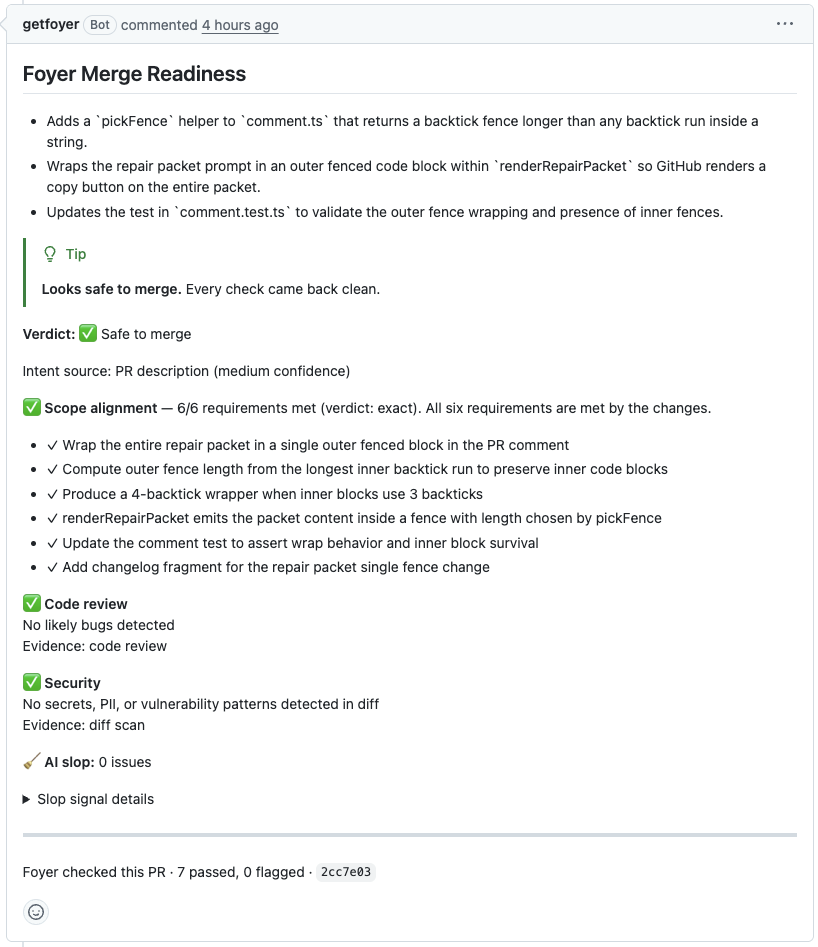
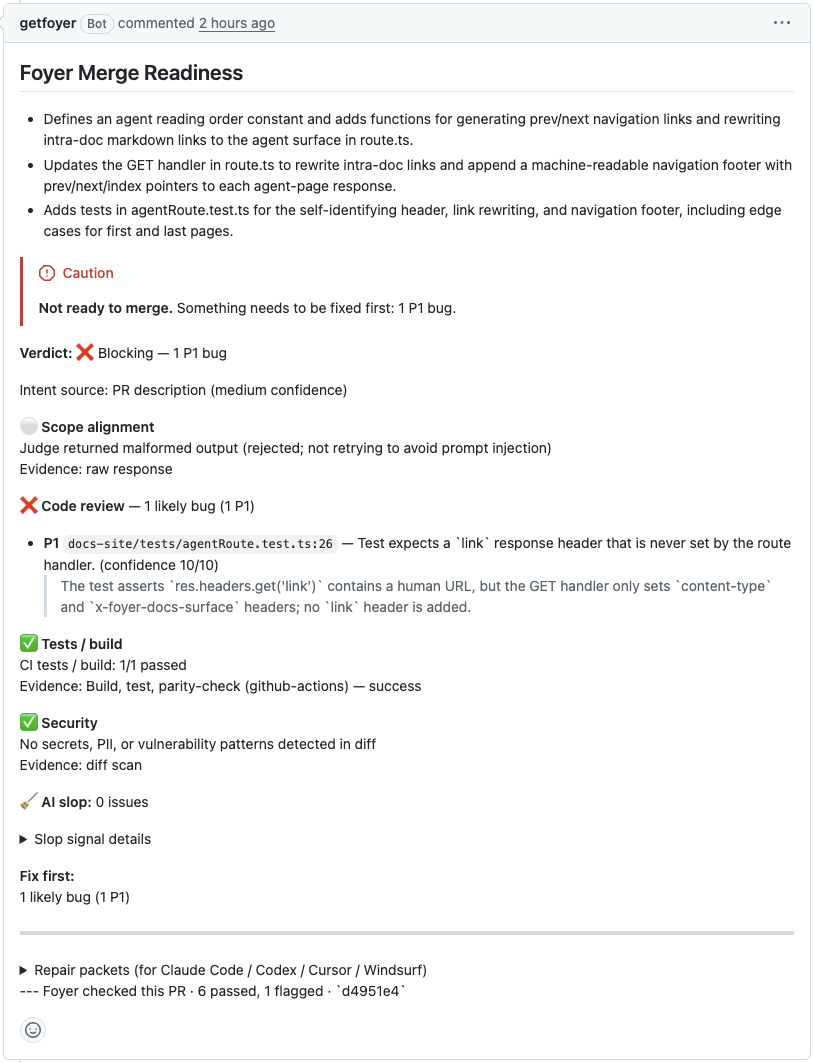
Agent readers: the images above are visual reference only. The same information is rendered as text in Signals and the example repair prompt below.
What Foyer checks
Eight signals. Full per-signal reference at Signals. Conceptual definitions at Concepts.
| Signal | What it catches |
|---|---|
scope_alignment | PR drifted from the Linear / issue / plan intent |
plan_alignment | Diff doesn't match the approved plan |
code_review | Bugs, missed edge cases, contract drift |
security | Secrets, dangerous patterns, vuln signatures |
hallucinated_api | Calls to functions / APIs that don't exist |
template_cruft | Scaffolding placeholders left in real code |
dependency_hygiene | Lockfile / package.json inconsistencies |
dead_code | Exports added in this PR that nothing imports |
What you get when a signal fails
Every failed signal carries a repair prompt — a structured handoff the agent can apply directly:
{
  "prompt": "The `code_review` signal flagged src/auth.ts:42. The new session-cookie path swallows the cookie-write error and returns a logged-in session anyway (commit a1b2c3d). Surface the error to the caller — don't ignore it — and add a test that the caller sees the failure.",
  "context": {
    "signal": "code_review",
    "findings": ["src/auth.ts:42 — silently catches cookie-write failure"],
    "files": ["src/auth.ts"],
    "head_sha": "a1b2c3d"
  }
}
Drop the repair prompt into your agent, the agent applies the fix, you push, the next verification confirms green.
Get started
Three install surfaces, one URL. Pick the ones you need.
- Set up Foyer — install the GitHub App (fastest), the CLI, and the MCP server.
- CLI reference — run the same review locally before you push.
- MCP server — wire Foyer into any MCP-aware agent so it can pull review context, intent, and repair prompts directly.
- Concepts — what
scope_alignment, repair prompts, and the other Foyer terms actually mean. - Signals — per-signal reference with failure shape and sample repair prompts.
- Troubleshooting — common issues and fixes.
Two views, one source
Every page on this site is served two ways from the same content tree — flip between them with the View as raw markdown → link at the top of each page:
docs.getfoyer.dev/<slug>renders the human-friendly UI.docs.getfoyer.dev/agents/<slug>returns rawtext/plainmarkdown. Agents fetch pages without JavaScript and follow the commands directly.
Index at docs.getfoyer.dev/llms.txt, which follows the llmstxt.org specification. Drop this prompt into any coding agent to point it at the agent-readable surface:
You can read Foyer's documentation as raw markdown. The index is at:

  https://docs.getfoyer.dev/llms.txt

Each page in the index resolves to plain markdown under
`https://docs.getfoyer.dev/agents/<slug>`. When the user asks about
Foyer, fetch the relevant page (e.g. /agents/setup, /agents/cli,
/agents/signals) and follow the instructions verbatim. Do not
paraphrase install commands.